TL;DR
- Learn how to scrape Google Lens results using Python.
- Use Webshare rotating residential proxies to avoid IP blocks and Google’s strict anti-bot detection.
- Extract and save Lens results – including titles, source URLs, thumbnails, and action links – to JSON or CSV.
- Use cases include brand protection, price monitoring, visual SEO, and detecting where your images are being reused across the web.
Google Lens is one of the most advanced visual-search engines available, capable of matching products, objects, and designs across millions of websites. In this guide, you’ll learn how to build a Google Lens scraper in Python that uploads image URLs directly to the Lens endpoint, processes dynamic results with Playwright, handles consent screens, and extracts structured data from the exact-match grid.
Prerequisites
Before building and running the Google Lens scraper, make sure your environment is set up with the required tools and dependencies.
- Python: You’ll need Python 3.9+ installed.Verify your version with:
python --version- Required Python Packages: This scraper uses Playwright for browser automation and async handling of Google Lens dynamic UI. Install the required package with:
pip install playwright- Built-in Modules: The following modules come with Python by default, but ensure they are available in your environment:
- asyncio - for asynchronous workflow
- json - for saving structured Lens output
- csv - for exporting results
- time, random - for timing delays and human-like behavior
- re - for parsing text content
- datetime - for timestamps
- urllib.parse (quote, urljoin, unquote) - for safe URL handling
- Playwright Browser Installation: After installing Playwright, install its browser binaries (Chromium) with:
playwright install chromium- Webshare Proxy Access: Google Lens results can vary by region, and repeated Lens uploads may trigger rate limits. Using Webshare rotating residential proxies helps you:
- Avoid IP blocks during high-volume scraping
- Simulate traffic from different countries
- Access consistent image-matching results from Lens
Scraping Google Lens
Follow these steps to scrape image results from Google Lens. Make sure you have completed all prerequisites before starting.
Step 1: Build the Google Lens URL (encode parameters correctly)
Before sending an image to Google Lens, you need to create a URL that Lens can understand. Google Lens requires the image URL to be URL-encoded, which means converting all special characters (like spaces, /, ?, &) into a safe format.
- If your URL isn’t properly encoded, Google Lens might fail to load the image or return incorrect results.
- In Python, you can use urllib.parse.quote():
from urllib.parse import quote

image_url = "https://example.com/image.png"
encoded_url = quote(image_url, safe="")
lens_url = f"https://lens.google.com/upload?url={encoded_url}"
Step 2: Set up the browser environment
Google Lens requires a browser context. You should:
- Use a modern Chromium browser (via Playwright).
- Set a realistic viewport size and user agent to mimic a real user.
- Use a rotating residential proxy to avoid geo-restrictions.
- Add a small script to mask automation detection (e.g., navigator.webdriver).
This setup ensures the scraping behaves like a real human user, reducing the chance of IP blocking or Captcha triggers.
Step 3: Handle cookie consent and captchas
When visiting Google Lens, you may encounter cookie consent popups or verification pages. To handle these:
- Detect and click the Accept or I agree buttons automatically.
- Pause briefly after interactions to mimic human behavior.
- Check the page title for unusual traffic or verification prompts; if detected, wait or retry.
Step 4: Navigate to the Exact Matches tab
Google Lens provides different types of results. The Exact Matches tab filters results that are visually identical to your input image.
- After loading the Lens URL, wait for the page to render completely.
- Programmatically switch to the “Exact Matches” tab using a selector.
- If the tab is not visible immediately, wait a few seconds and retry, as Google Lens can load content dynamically.
Step 5: Wait for results to load
Results in Google Lens are loaded asynchronously. To ensure you capture all results:
- Wait for result cards to appear using their CSS selectors.
- Detect loading indicators and pause until they disappear.
- Handle “No results” messages gracefully.
Step 6: Extract result data
Each result card can contain multiple pieces of information:
- Title - The name or description of the matched item.
- Source URL - The website or domain where the image is found.
- Action URL - Direct link to view the image or webpage.
- Thumbnail URL - Small preview image.
Step 7: Save results for later use
Once results are extracted:
- Save the data in JSON format for structured storage.
- Export to CSV for easy viewing.
Here’s the complete code:
import asyncio
import json
import csv
import time
import random
import re
from urllib.parse import quote, urljoin, unquote
from datetime import datetime
from playwright.async_api import async_playwright, TimeoutError

class GoogleLensScraper:
    def __init__(self):
        self.browser = None
        self.page = None
        self.playwright = None
        self.base_url = "https://lens.google.com/upload"

        # Selectors
        self.selectors = {
            'exact_matches_tab': 'div[role="listitem"] a[aria-disabled="true"] div[class*="mXwfNd"]:has-text("Exact matches")',
            'exact_matches_tab_simple': 'a[aria-disabled="true"]:has-text("Exact matches")',
            'individual_result': 'a[class*="ngTNl"][class*="ggLgoc"]',
            'title': 'div[class*="ZhosBf"][class*="dctkEf"]',
            'source_name': 'div[class*="xuPcX"][class*="yUTMj"]',
            'thumbnail': 'img[src*="data:image"], img[src*="http"]',
            'action_url': 'a[class*="ngTNl"][class*="ggLgoc"]',
        }

    async def setup_browser(self, use_proxy=True, proxy_country='US'):
        await self.close()

        self.playwright = await async_playwright().start()

        launch_args = {
            'headless': True,
            'args': [
                '--no-sandbox',
                '--disable-blink-features=AutomationControlled',
                '--disable-dev-shm-usage',
                '--window-size=1280,800',
            ]
        }

        if use_proxy:
            username = f"username-{proxy_country}-rotate" # Enter username
            password = "password" # Enter password
            proxy_config = {
                'server': 'http://p.webshare.io:80',
                'username': username,
                'password': password
            }
            launch_args['proxy'] = proxy_config

        self.browser = await self.playwright.chromium.launch(**launch_args)

        context = await self.browser.new_context(
            viewport={'width': 1280, 'height': 800},
            user_agent=(
                'Mozilla/5.0 (Windows NT 10.0; Win64; x64) '
                'AppleWebKit/537.36 (KHTML, like Gecko) '
                'Chrome/120.0.0.0 Safari/537.36'
            ),
            locale='en-US',
            timezone_id='America/New_York',
        )

        await context.add_init_script(
            "() => { Object.defineProperty(navigator, 'webdriver', { get: () => undefined }); }"
        )

        self.page = await context.new_page()

    async def handle_cookies(self):
        try:
            await asyncio.sleep(2)
            consent_selectors = [
                'button#L2AGLb',
                "button:has-text('Accept all')",
                "button:has-text('I agree')",
                "button:has-text('Accept')"
            ]

            for selector in consent_selectors:
                try:
                    btn = self.page.locator(selector).first
                    if await btn.is_visible(timeout=2000):
                        await btn.click()
                        await asyncio.sleep(1)
                        break
                except:
                    continue
        except:
            pass

    async def switch_to_exact_matches(self):
        try:
            await asyncio.sleep(3)

            tab_selectors = [
                self.selectors['exact_matches_tab'],
                self.selectors['exact_matches_tab_simple'],
                'a:has-text("Exact matches")',
                'button:has-text("Exact matches")',
                'div[role="tab"]:has-text("Exact matches")',
            ]

            for selector in tab_selectors:
                try:
                    tab = self.page.locator(selector).first
                    if await tab.is_visible(timeout=5000):
                        await tab.click()
                        await asyncio.sleep(random.uniform(3, 5))
                        return True
                except:
                    continue
            return False
        except:
            return False

    async def wait_for_results(self):
        try:
            for _ in range(10):
                await asyncio.sleep(2)

                # Check if results are visible
                results = await self.page.query_selector_all(self.selectors['individual_result'])
                if len(results) > 0:
                    return True

                # Check for loading indicators
                loading = await self.page.query_selector('div[aria-label*="Loading"], div:has-text("Searching")')
                if loading and await loading.is_visible():
                    continue

                # Check for no results
                no_results = await self.page.query_selector('div:has-text("No results"), div:has-text("no matches")')
                if no_results and await no_results.is_visible():
                    return False
        except:
            pass
        return False

    async def extract_results(self, max_results=10):
        results = []

        try:
            # Wait for results to load
            has_results = await self.wait_for_results()
            if not has_results:
                return results

            # Scroll a bit to load all content
            await self.page.evaluate('window.scrollBy(0, 500)')
            await asyncio.sleep(2)

            # Find all result cards
            result_elements = await self.page.query_selector_all(self.selectors['individual_result'])

            if not result_elements:
                return results

            for element in result_elements[:max_results]:
                result_data = await self.extract_single_result(element)
                if result_data:
                    results.append(result_data)

                await asyncio.sleep(0.5)

        except:
            pass

        return results

    async def extract_single_result(self, element):
        try:
            # Extract title
            title_element = await element.query_selector(self.selectors['title'])
            title = ''
            if title_element:
                title_text = await title_element.text_content()
                if title_text:
                    title = title_text.strip()

            # Extract source
            source_element = await element.query_selector(self.selectors['source_name'])
            source = ''
            if source_element:
                source_text = await source_element.text_content()
                if source_text:
                    source = source_text.strip()

            # Extract thumbnail
            thumbnail_element = await element.query_selector(self.selectors['thumbnail'])
            thumbnail = ''
            if thumbnail_element:
                thumbnail_src = await thumbnail_element.get_attribute('src')
                if thumbnail_src:
                    thumbnail = thumbnail_src

            # Extract action URL - get href from the element itself
            link = ''
            href = await element.get_attribute('href')
            if href:
                if href.startswith('/'):
                    href = urljoin('https://lens.google.com', href)
                link = href
            else:
                # Try to extract from ping attribute
                ping = await element.get_attribute('ping')
                if ping and '/url?' in ping:
                    match = re.search(r'url=([^&]+)', ping)
                    if match:
                        link = unquote(match.group(1))

            if title or source or link:
                return {
                    'title': title,
                    'source_url': source,
                    'action_url': link,
                    'thumbnail_url': thumbnail

                }

        except Exception as e:
            pass

        return None

    async def scrape_single_image(self, image_url, max_results=10):
        results = []
        max_retries = 2

        for attempt in range(1, max_retries + 1):
            try:
                encoded_url = quote(image_url, safe='')
                lens_url = f"{self.base_url}?url={encoded_url}"

                await self.page.goto(lens_url, wait_until='domcontentloaded', timeout=30000)
                await asyncio.sleep(random.uniform(3, 5))

                await self.handle_cookies()

                # Check if we got a captcha/verification page
                page_title = await self.page.title()
                if 'unusual traffic' in page_title.lower() or 'verify' in page_title.lower():
                    print("Detected verification page")
                    await asyncio.sleep(5)
                    continue

                tab_switched = await self.switch_to_exact_matches()

                if tab_switched:
                    page_results = await self.extract_results(max_results)

                    if page_results:
                        results = page_results
                        break

                await asyncio.sleep(random.uniform(2, 3))

            except TimeoutError:
                print(f"Timeout on attempt {attempt}")
            except Exception:
                pass

            if attempt < max_retries:
                wait_time = random.uniform(5, 8)
                await asyncio.sleep(wait_time)

        return results

    async def scrape_images(self, image_urls, use_proxy=True, proxy_country='US', max_results=10, delay_between=20):
        all_results = {}

        start_time = time.time()

        await self.setup_browser(use_proxy=use_proxy, proxy_country=proxy_country)

        try:
            for i, image_url in enumerate(image_urls):

                image_results = await self.scrape_single_image(image_url, max_results)
                all_results[image_url] = image_results

                print(f"Found {len(image_results)} results for this image")

                if i < len(image_urls) - 1:
                    wait_time = random.uniform(delay_between, delay_between + 10)
                    print(f"Waiting {wait_time:.1f} seconds before next image")
                    await asyncio.sleep(wait_time)

        finally:
            await self.close()

        end_time = time.time()
        print(f"Scraping completed in {end_time - start_time:.2f} seconds")

        return all_results

    async def close(self):
        try:
            if self.page:
                await self.page.close()
                self.page = None
        except:
            pass

        try:
            if self.browser:
                await self.browser.close()
                self.browser = None
        except:
            pass

        try:
            if self.playwright:
                await self.playwright.stop()
                self.playwright = None
        except:
            pass

    def save_results(self, results, base_filename):
        if not results:
            print("No results to save")
            return

        total_results = sum(len(image_results) for image_results in results.values())
        print(f"Saving {total_results} total results")

        timestamp = datetime.now().strftime("%Y%m%d_%H%M%S")
        json_filename = f"{base_filename}_{timestamp}.json"
        csv_filename = f"{base_filename}_{timestamp}.csv"

        with open(json_filename, 'w', encoding='utf-8') as f:
            json.dump(results, f, indent=2, ensure_ascii=False, default=str)
        print(f"Saved JSON to {json_filename}")

        rows = []
        for image_url, image_results in results.items():
            for result in image_results:
                rows.append({
                    'input_image_url': image_url,
                    'title': result.get('title', ''),
                    'source_url': result.get('source_url', ''),
                    'action_url': result.get('action_url', ''),
                    'thumbnail_url': result.get('thumbnail_url', '')

                })

        if rows:
            with open(csv_filename, 'w', newline='', encoding='utf-8') as f:
                writer = csv.DictWriter(f, fieldnames=['input_image_url', 'title', 'source_url', 'action_url', 'thumbnail_url'])
                writer.writeheader()
                writer.writerows(rows)
            print(f"Saved CSV to {csv_filename}")


async def main():
    image_urls = [
        "https://images.unsplash.com/photo-1546069901-ba9599a7e63c"
    ]

    scraper = GoogleLensScraper()

    # Use proxy
    results = await scraper.scrape_images(
        image_urls=image_urls,
        use_proxy=True,
        proxy_country='US',
        max_results=10,
        delay_between=20
    )

    if results:
        scraper.save_results(results, "google_lens_results")
        print("Results preview:")
        for img_url, img_results in results.items():
            if img_results:
                for i, result in enumerate(img_results[:2], 1):
                    print(f"Result {i}:")
                    print(f"  Title: {result.get('title', 'N/A')}")
                    print(f"  Source: {result.get('source_url', 'N/A')}")
                    print(f"  URL: {result.get('action_url', 'N/A')[:80]}...")
                break
    else:
        print("No results found.")

await main()
Note: This code uses await main() which works in Google Colab and Jupyter notebooks. For regular Python scripts, use this instead:
if __name__ == "__main__":
    asyncio.run(main())
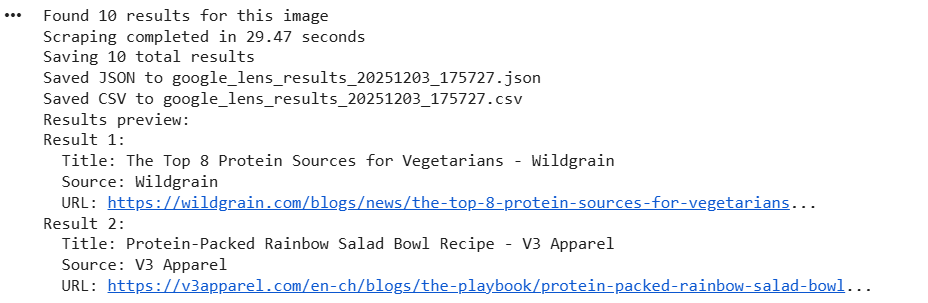
Here’s the console output:
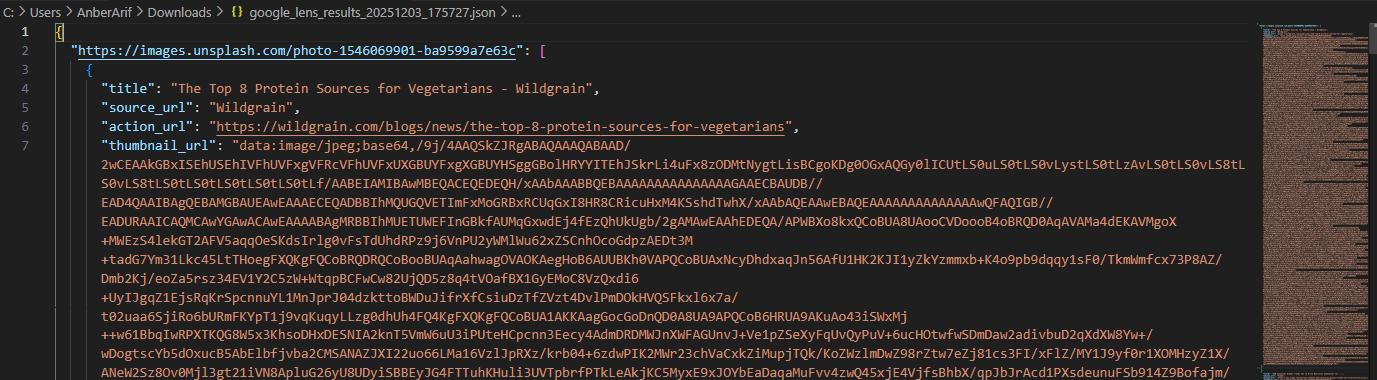
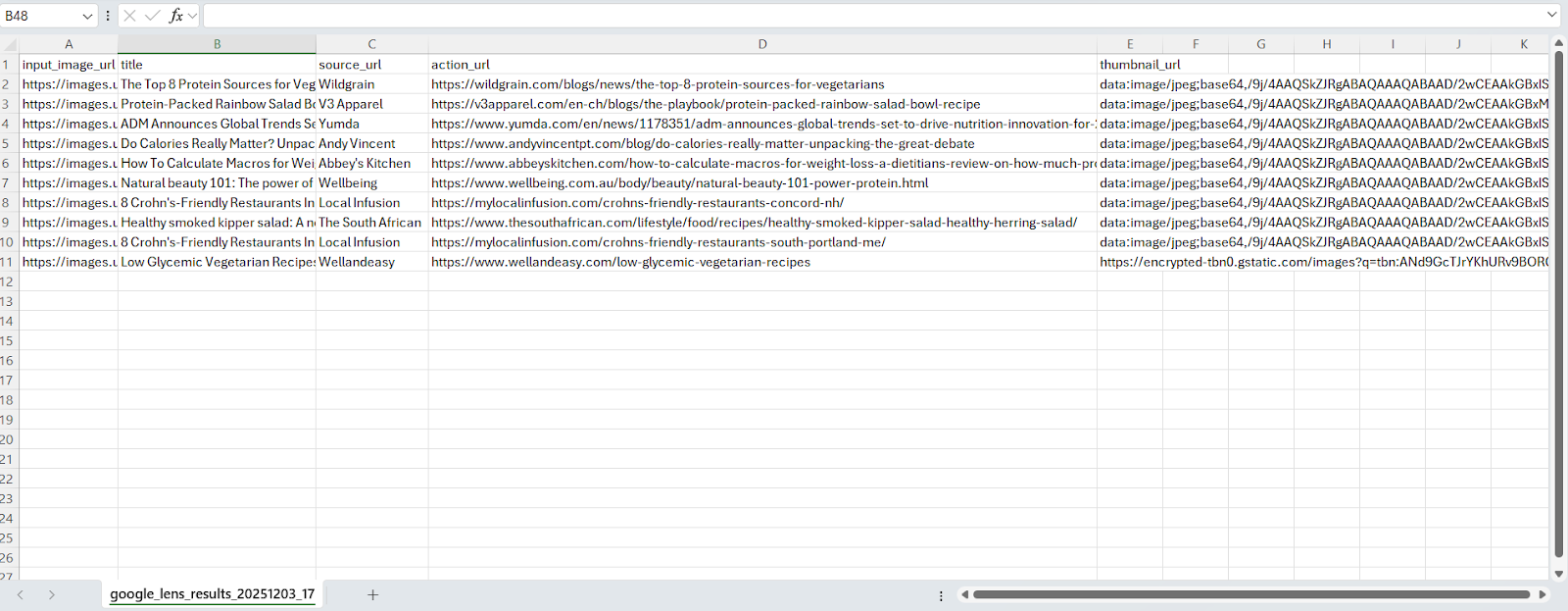
The generated files are as:
Wrapping up: Scrape Google Lens
In this article, we built a Google Lens scraper using Playwright and Webshare rotating residential proxies to handle geo-restrictions and avoid detection. The solution extracts results including titles, source URLs, action URLs, and thumbnails - while ensuring URL parameters are encoded correctly, handling cookie consent, and saving results in JSON and CSV formats.