AIOHTTP is a versatile Python library that provides an asynchronous framework for handling HTTP requests and building web servers. Built on Python's asyncio, it enables non-blocking I/O operations, allowing developers to perform multiple tasks simultaneously without waiting for each operation to complete. This makes it an ideal choice for scenarios that demand high performance and scalability, such as real-time applications, API integrations, and large-scale web scraping.
In AIOHTTP, a proxy acts as an intermediary between your client and the server, masking your original IP address and ensuring anonymity. In this article, we’ll guide you through three effective ways to set up proxies with AIOHTTP: using a static HTTP proxy, an HTTP proxy list, and a SOCKS5 proxy. We’ll also cover a bonus method for configuring residential proxies and discuss advanced proxy configurations and troubleshooting common issues.
Method 1: Static HTTP proxy (Simple)
Method 2: HTTP Proxy list (Proxy list)
Prerequisites
Before setting up proxies in AIOHTTP, ensure you have the following prerequisites ready:
- Python Installed: Ensure you have Python 3.7 or later installed on your system. You can download it from the Python website.
- AIOHTTP Library: Install the AIOHTTP library using pip if you haven’t already. Run the following command in your terminal or command prompt:
pip install aiohttp- Proxy Service: AIOHTTP supports proxy configurations for both HTTP and SOCKS5 proxies. For an easy start, Webshare provides a free plan that includes 10 shared datacenter proxies. These proxies come with a 1GB monthly bandwidth limit and offer options for both rotating and static configurations. Once you sign up, you can find the required proxy details, including username, password, host, and port, in your Webshare account dashboard.
Below is the structure of a proxy URL required to connect to a proxy server in AIOHTTP:
<PROTOCOL>://[<USERNAME>:<PASSWORD>@]<HOST>[:<PORT>]Only the <PROTOCOL> and <HOST> parts are mandatory. However, <PORT> is often needed to establish the connection, and <USERNAME>:<PASSWORD> is only necessary for authenticated proxies.
- Python IDE or Text Editor: Use an environment like VS Code, PyCharm, or any text editor of your choice to write and run your Python scripts.
Method 1: Static HTTP proxy
A static HTTP proxy is a single proxy server used for all requests. This method is straightforward and ideal for scenarios where a single proxy suffices. Here's how to set it up in AIOHTTP.
How to configure a static proxy
Use the proxy URL format discussed earlier to define your proxy settings. Here’s a basic example of configuring an HTTP proxy:
import aiohttp
import asyncio

async def fetch_with_proxy():
    proxy = "http://username:password@proxyhost:port"  # Replace with your static proxy
    url = "https://httpbin.org/ip"

    async with aiohttp.ClientSession() as session:
        async with session.get(url, proxy=proxy) as response:
            print(await response.text())

# If you're in an interactive environment, use this:
await fetch_with_proxy()- Proxy URL: Replace proxyhost, port, username, and password with the credentials of your HTTP proxy. Omit username:password@ if authentication isn’t required.
- URL: Use any endpoint for testing; https://httpbin.org/ip is a common choice as it returns your current public IP.
How to test the static proxy configuration
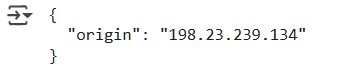
Run the script. If the proxy is working, the output will show the IP address of the proxy server instead of your original IP.
Method 2: HTTP Proxy list
Using a list of HTTP proxies allows you to dynamically switch between proxies during your requests. This is particularly useful for tasks like web scraping, where you might want to avoid rate-limiting or bans.
How to configure HTTP proxy list
First, prepare a list of proxy URLs in the correct format. Then, use a random or sequential method to pick proxies from the list. Here’s an example implementation:
import aiohttp
import asyncio
import random

proxies = [
    "http://username:password@proxy1host:port",
    "http://username:password@proxy2host:port",
    "http://username:password@proxy3host:port"
]

async def fetch_with_proxy():
    proxy = random.choice(proxies)  # Select a random proxy
    url = "https://httpbin.org/ip"

    async with aiohttp.ClientSession() as session:
        async with session.get(url, proxy=proxy) as response:
            print(await response.text())

await fetch_with_proxy()- Proxy List: Replace the placeholders in the proxy URLs with your actual proxy details.
- Random Selection: The random.choice(proxies) ensures a different proxy is used for each request. You can replace this with a sequential approach if needed.
How to test the HTTP proxy list configuration
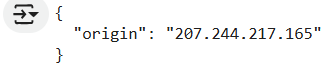
Run the script in your interactive environment. The output will show the corresponding IP address returned by the server.
Method 3: SOCKS5 proxy
A SOCKS5 proxy provides advanced functionality, such as UDP support and enhanced security. AIOHTTP supports SOCKS5 proxies through the aiohttp_socks library. This method explains how to configure and use SOCKS5 proxies in your requests.
How to configure SOCKS5 proxy
First, install aiohttp socks to enable SOCKS5 support using the below command:
pip install aiohttp-socksPrepare your SOCKS5 proxy URL. The format is:
socks5://[username:password@]host:portThe aiohttp_socks library provides a ProxyConnector to handle SOCKS5 proxies. Here’s how to configure it:
from aiohttp_socks import ProxyConnector
import aiohttp
import asyncio

proxy = "socks5://username:password@proxyhost:port"

async def fetch_with_proxy():
    connector = ProxyConnector.from_url(proxy)  # Create a SOCKS5 connector
    url = "https://httpbin.org/ip"

    async with aiohttp.ClientSession(connector=connector) as session:
        async with session.get(url) as response:
            print(await response.text())

await fetch_with_proxy()- ProxyConnector: The ProxyConnector is initialized using the SOCKS5 proxy URL.
- Session Handling: The connector is passed to aiohttp.ClientSession, ensuring all requests use the configured proxy.
How to test the SOCKS5 proxy configuration
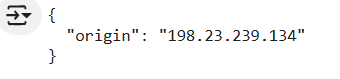
Run the script in your interactive environment. If the proxy is correctly set up, the output will display the IP address of the proxy server.
Bonus method: Residential proxies in AIOHTTP
Residential proxies provide IP addresses assigned by Internet Service Providers (ISPs) to real devices, making them less likely to be detected or blocked compared to datacenter proxies. This method explains how to integrate residential proxies with AIOHTTP.
How to setup residential proxy in AIOHTTP
Before setting up, ensure you have access to a residential proxy service. Typically, you'll receive credentials, such as:
- Proxy URL: http://username:password@residentialproxy.com:port
- Username and Password for authentication.
Here’s how to configure AIOHTTP to use a residential proxy:
import aiohttp
import asyncio

proxy = "http://username:password@residentialproxy.com:port"

async def fetch_with_proxy():
    url = "https://httpbin.org/ip"  # URL to test the proxy

    async with aiohttp.ClientSession() as session:
        async with session.get(url, proxy=proxy) as response:
            print(await response.text())

await fetch_with_proxy()- Proxy Parameter: The proxy parameter in session.get() explicitly defines the proxy to use for the request.
- Authentication: The credentials (username:password) in the proxy URL handle authentication automatically.
How to test the residential proxy configuration
Run the script to verify the connection through the residential proxy. The output should display the residential proxy’s IP address.
Advanced proxy configuration
Advanced proxy configurations can significantly improve the efficiency and reliability of your scraping setup. Below are additional advanced techniques for managing proxies and optimizing scraping tasks.
Rotating user-agents with proxies
Using the same user-agent for multiple requests can lead to detection. Combining user-agent rotation with proxies can mimic different devices or browsers, reducing the chance of being blocked.
import aiohttp
import asyncio
import random

USER_AGENTS = [
    "Mozilla/5.0 (Windows NT 10.0; Win64; x64) AppleWebKit/537.36 (KHTML, like Gecko) Chrome/91.0.4472.124 Safari/537.36",
    "Mozilla/5.0 (Macintosh; Intel Mac OS X 10_15_7) AppleWebKit/537.36 (KHTML, like Gecko) Chrome/91.0.4472.124 Safari/537.36",
    "Mozilla/5.0 (Linux; Android 10) AppleWebKit/537.36 (KHTML, like Gecko) Chrome/91.0.4472.124 Mobile Safari/537.36"
]

async def fetch_with_user_agent_and_proxy(url, proxy):
    headers = {"User-Agent": random.choice(USER_AGENTS)}
    async with aiohttp.ClientSession(headers=headers) as session:
        async with session.get(url, proxy=proxy) as response:
            return await response.text()

async def main():
    url = "https://httpbin.org/ip"
    proxy = "http://username:password@proxy.com:port"
    response = await fetch_with_user_agent_and_proxy(url, proxy)
    print(response)

await main()- User-Agent Rotation: The USER_AGENTS list contains various User-Agent strings that represent different browsers and operating systems. By randomly selecting a user-agent for each request, you can make your scraping activity appear more like that of a real user.
- Fetch Function: The fetch_with_user_agent_and_proxy function takes a URL and a proxy as input. It randomly selects a user-agent from the USER_AGENTS list and sets it in the request headers. The function then makes an asynchronous GET request to the specified URL using the provided proxy.
- Main Function: The main function defines the URL to be accessed (https://httpbin.org/ip) and specifies a proxy. It calls the fetch_with_user_agent_and_proxy function and prints the response.
IP geolocation-based proxy selection
Certain websites serve content based on the user's IP location. Implementing a proxy selection strategy based on geolocation ensures accurate data collection.
import aiohttp
import asyncio

GEO_PROXIES = {
    "US": "http://username:password@us-proxy.com:port",
    "UK": "http://username:password@uk-proxy.com:port",
    "FR": "http://username:password@fr-proxy.com:port"
}

async def fetch_by_region(url, region):
    proxy = GEO_PROXIES.get(region, None)
    if not proxy:
        raise ValueError(f"No proxy available for region: {region}")

    async with aiohttp.ClientSession() as session:
        async with session.get(url, proxy=proxy) as response:
            return await response.text()

async def main():
    url = "https://httpbin.org/ip"
    regions = ["US", "UK", "FR"]
    tasks = [fetch_by_region(url, region) for region in regions]
    results = await asyncio.gather(*tasks)
    for result in results:
        print(result)

await main()- Geolocation-Based Proxy Dictionary: The GEO_PROXIES dictionary maps regions to their respective proxy URLs. This allows for easy selection of proxies based on the desired location.
- Fetch Function: The fetch_by_region function takes a URL and a region as input. It retrieves the appropriate proxy from the GEO_PROXIES dictionary and makes an asynchronous GET request to the specified URL using that proxy. If no proxy is available for the specified region, it raises a ValueError.
- Main Function: The main function defines the URL to be accessed and a list of regions. It creates a list of tasks to fetch data from the URL for each region concurrently using asyncio.gather.
Fixing common issues
While using proxies with AIOHTTP, you might encounter various challenges. Below are the common issues and how to resolve them.
Invalid proxy url format
Symptom: Errors occur like Invalid URL or ValueError: Proxy URL is not valid.
Cause: The proxy URL provided doesn’t follow the correct format.
Solution: Ensure the proxy URL matches the required format: <PROTOCOL>://[<USERNAME>:<PASSWORD>@]<HOST>[:<PORT>]
Connection timeout
Symptom: Requests take too long and eventually fail with a timeout error.
Cause: The proxy server is slow or unresponsive.
Solution: Test the proxy's responsiveness before using it. Adjust the timeout setting in AIOHTTP using ClientTimeout:
timeout = aiohttp.ClientTimeout(total=10)
async with aiohttp.ClientSession(timeout=timeout) as session:
    # Continue with your task
Or, setup a retry mechanism for failed requests.
setUserAgent command ignored
Symptom: Despite setting a custom User-Agent, requests are identified as bots.
Cause: The custom User-Agent header isn’t applied to requests or is overridden.
Solution: Ensure the User-Agent is set explicitly in the request:
headers = {"User-Agent": "Mozilla/5.0"}
async with session.get(url, headers=headers, proxy=proxy) as response:
    # Continue with your task
Wrapping up: proxy in AIOHTTP
Integrating proxies with AIOHTTP is a powerful way to optimize your web scraping, data fetching, and API interactions. By configuring proxies properly, you can enhance security, improve performance, and avoid detection. With the right setup, proxies can help you overcome challenges like IP blocking, rate limiting, and captchas, making your web requests more reliable and efficient.